Friday, December 23, 2016

Just Enough (Temporary Remote) Administration - (Part 1)

11:50 AM Posted by A , No comments


Scenario/poll: Show of hands administrators - how many of you have an environment wherein individual user accounts are granted remote desktop access, to specific machines, and still have them even when they don't need those rights?

Keep your hands up - how many of you would like to know who those accounts are? When they got that permission? Who gave them the permission? etc.


The above scenario I'm sure is a common one that most departments will either deny or have no idea to the extent that it's happening. Even still, should the question be posed of "Well how bad is it in our environment?" who can answer this question quickly? I mean truly quickly. I mean in under 1 minute quickly!

Service Manager to the Rescue...
In the days before SCSM and SCO/SMA I found myself in this situation all too often. Whether it be places I was working full time or consulting at, there was always a degree of this one-off and non-auditable behavior. In the time since a lot (and I mean a lot) of single purpose tools have been created to address this incredibly specific situation. But with those tools come some rather high price tags.

I am a huge fan of less tools, more standards, and leveraging what I have before committing to something wholly new (and so wildly specific in this case). So with System Center in your environment, could we address this issue?

HELL YEAH!

To solve this, we're going to leverage native Service Manager and Orchestrator functionality. 1 Service Request and 2 really tiny runbooks. Depending on your experience with the ecosystem the following is either going to incredibly obvious making this post a waste of your time OR perhaps you're just getting started and looking for ideas to impress your colleagues. So if it's the second one...let's impress your colleagues!


So just what exactly are we going to build?
  • Reduce privileged access in the environment through SCO
  • Provide instant auditable and reportable data through SCSM
  • Prevent members of your organization from "gaming" this request through SCO/SCSM
Enough teasing your respective IT security teams. Let's get to building.


It's not backwards, it's Orchestrator first...
We're going to create two runbooks within Orchestrator as our first steps. If you followed my "New Employee" and HR processes series of blogs OR you're just getting started with System Center this approach may seem entirely backwards but I assure you it'll work out.

As a preface to this, whatever SCO account you choose to accomplish this will absolutely need to be a Local Admin on the machine(s) you are going to perform this against. While I originally thought to myself "Ugh, I don't want to grant admin access to another account. That's the thing I'm trying to solve!" But again - we're adding a single automated account that no one controls (except Orchestrator) to invoke these actions on our behalf.

  • UPDATE: I wanted to expand a bit more on the above paragraph with respect to "whatever SCO account you choose..." as it always seems to prompt the question "Well how could I chose?" By default the "Run .NET Script" activity will be run with the SCO service account. Since you probably don't want to distribute the Orchestrator service account to machines in your environment it would make much more sense to create a dedicated account to perform this function. Then save it's username and password as Global Variables in SCO. Then use an invoke-command with the scripts found below and leverage the credentials there. That way SCO is the thing spinning up the script, but it gets executed with an entirely different set of credentials on the remote machine. If you're unfamiliar with how to call credentials in PowerShell this is the most straightforward post on the matter. Just wanted to add this as I was writing this post in conjunction with deving this in a dev environment and as such not thinking this through as much as I should have for a post trying to be so security focused.


Runbook 1 - Grant x Permission on y Machine
High Level: We're going to obtain the Affected User of a Service Request, take the Windows Computer they selected on our request offering page, take the time they needed on this machine and then add them to some local security group on a machine. For the purpose of this post, I'm going to hardcode "Administrators" into the PowerShell script that grants permissions. However I'm confident that after walking through this, you could easily see how to alter this to either change the local group in the PowerShell script or allow the requesting user to select which group they would want to be in and then pass it into this runbook.


Finally, we'll have this (aforementioned) runbook execute a child runbook so they get removed from this group when the time they selected is up. To prevent the requesting person from keeping the permission, we're going to make sure this child runbook is not dependent on finishing based on the Parent Runbook's status (which will be "Complete"). By doing this it means once the first runbook finishes, the Service Request will be marked as Completed even though this second, non-dependent runbook is silently counting away to remove permissions at the selected time.

Initialize Data: We'll create one parameter and call it "ActivityGUID"

Get Relationship (RB to SR): We'll move from the SCO Runbook object and get the related (parent) Service Request


Get SR: We'll get the Service Request object


Get Relationship (SR to AU): We'll move from the Service Request and obtained the Affected User


Get Affected User: We'll get the related object from the previous Get Relationship step and obtain the Affected User object


Get Relationship (RB to Windows Computer): We'll get the Windows Computer that was selected on the request offering and mapped to the Runbook.


Get Computer: We'll get the Windows Computer object


Grant Access on Computer: We'll take all the objects we fetched from our previous steps and use it to drive a PowerShell script that adds the Affected User to the Local Administrators group on the selected Windows Computer. The good news is this PowerShell script will work with PowerShell 2.0 functionality, so you won't have to pull your hair out dealing with workarounds for getting PS 3+ working here. We'll use Ed Wilson's "The Scripting Guy's" two liner and just substitute the variables with our variables from the SCO databus. We'll also add a few lines for some simple datetime math. I've also put the script in here so you can quickly copy and past.

Don't forget that you'll have to head over to the "Published Data" tab on this Run .NET Script activity and make sure you publish the variable "timeToWaitInSeconds" so you can consume this data downstream in the second runbook. As far as datatype, a string will do.

[datetime]$currentTime = get-date
[datetime]$srScheduledEndTime = "srSCHEDULEDENDTIME"
$timeToWait = $srScheduledEndTime - $currentTime
$timeToWaitInSeconds = $timeToWait.TotalSeconds

$computer = "COMPUTERHERE"
$group = "Administrators"
$domain = "DOMAINNAME"
$user = "USERNAME"
$de = [ADSI]“WinNT://$computer/$Group,group”
$de.psbase.Invoke(“Add”,([ADSI]“WinNT://$domain/$user”).path)


So why the whole $currentTime thing? Why not just use the Service Request's created date, or the Runbook's Created Date?

The request process I'm showing only addressing the technical backend of this whole thing. That said, it would make sense that in your Service Request template to perhaps place a Review Activity before this activity or any other series of internal organization processes before this runbook invokes itself. But whether you do or do not when this runbook invokes it will grab the current datetime so that when the calculation runs to determine "how long to grant access" it will be the most accurate reflection of time that was requested.

02 - Revoke Permissions on Computer: Finally we'll pass all those previously obtained objects and the requested time into a non-dependent (i.e. "Wait for Completion" is unchecked on this Invoke Runbook activity) child runbook that start-sleeps for the selected period of time before removing the permissions. But before we can pass these variables from the SCO databus, we'll need to construct the 2nd runbook and create some parameters first. This one is super simple:


Runbook 2 - Remove x Permission on y Machine after z Period of Time (glad I only need three variables in this lead in)
High Level: We're going to take the Affected User, computer, and period of time in seconds from the parent runbook and pause this runbook until the timer expires.


Pause? How are we going to pause? Orchestrator and even SMA (PowerShell) don't really pause, they sort of just go and do their thing.

Quite simply we're just going to leverage the "start-sleep" cmd-let of PowerShell for the time the user selected on the Service Request.

Oh. Yeah...that. Nevermind.

We're also going to allow concurrent executions of this runbook so multiple people can make the request at the same time in addition to getting their rights revoked at the time selected as opposed to letting runbook jobs get queued up thus breaking the thing we're trying to setup here. But how are we going to remove the user that originally requested this? Good news, it's the almost identical script used in the adding of permissions, we're just going to change a few things. See if you can spot the differences.

Also the published data used in the screenshot here is the Parameters you'll have to create for your Initialize Data activity that proceeds this. To be perfectly clear those are:

  • endTimeInSeconds
  • computerName
  • userDomain
  • username
As for the script:


start-sleep -seconds "TIMEINSECONDS"
$computer = "COMPUTERHERE"
$group = "Administrators"
$domain = "DOMAINNAME"
$user = "USERNAME"

$de = [ADSI]“WinNT://$computer/$Group,group”
$de.psbase.Invoke(“Remove”,([ADSI]“WinNT://$domain/$user”).path)


This completes the Orchestrator part of this request. Next thing we'll do is head over to SCSM, sync these runbooks, create their respective activity templates, create the Service Request template, add the runbook activities into the SR template, then finally create the Request Offering.

If you made it this far then the "hard part" is over! I hope this provides a framework which you can build off.
  • Maybe call a script to delete local user profiles after the timer expires?
  • Maybe send the Affected User that their time is going to expire soon?


I'm sure there are any number of organizational processes you could incorporate into this! In the next post, we'll do all of the SCSM work.


Until next time. Make On!



Thursday, November 24, 2016

But seriously...someone explain Management Packs to me

1:21 PM Posted by A No comments


If you're new to the Microsoft System Center realm (and as I often joke) I have but two simple words for you:

Buckle up

When you're getting started in SCOM or SCSM you will very quickly run into the concept of management packs. Regardless of how little or much experience in you have in IT, if you've never used System Center then you've probably never had to come around to this concept of a management pack. As it was first explained to me...

Management packs store customizations that extend the core platform

And while it is most certainly a factual description, there isn't really anything tangible about that statement. I would argue that's the kind of statement that you come to understand with experience and less of a reasonable explanation to any newcomer of the platforms. Since there isn't any use in making you feel like an outsider, let's break down the roles of SCOM/SCSM first which may help you to come to understand what these things are and the architectural reasoning behind them.


SCOM/SCSM really can't do all that much out of the box...
The opening to this may come as a bit of a shock to some but like any new tool in an IT environment their is a degree of mandatory required configuration.

So let's start with possibly the most cliche of analogies - if you were building a house, you'd need to pour the foundation and get basic infrastructure up. After you have the core structure setup, you're free to add whatever you want onto it. Hardwood floors, solar panel roof, etc. The point here is that you probably intuitively understand their is a clear separation between the core house/infrastructure that was built and all of the amenities you choose to place inside of it.

It's with this said SCOM/SCSM are no different in that they are both core pieces of infrastructure and don't really provide much measureable value until you start customizing them to your particular needs. This is where the idea of Management Packs come in.


"Well the product doesn't do this natively. It could, but..."
So let's go through a brief exercise and we'll pretend you, the reader, are Microsoft. I mean, you are all of Microsoft. The all powerful Zoltar..err Microsoft. You need to create a piece of software that any customer could use and tailor to their needs but one that you could still upgrade, patch, etc. at whim without disrupting A SINGLE ONE of their customizations. How would you achieve this?

Again, returning to our house analogy - Microsoft has constructed the houses of SCOM and SCSM. But they've left it up to you to design, customize, and tailor what's inside of it. What's more, the only thing you can't do is touch the core infrastructure. You can build off of it, you can copy the work and built duplicates inside but you cannot touch the core infrastructure. You could even hire contractors (vendors) to do some of this improvement for you. Enough analogy, let's get practical with examples of two such customizations.


A Service Manager example...

Show me a view of all Incidents, that are in an Active status, created in the last 4 days.

While a perfectly reasonable view you may want to see of Incidents, is it a view that all customers who deploy SCSM want? Wouldn't it be easier to leave this kind of custom views to customers? Does it not make more sense to leave these kind of things to "organizational processes" and less "enterprise standards" ?

So if Microsoft won't roll this out of box for you, it makes sense to leave this kind of customization up to you. How could this be done? With a custom, unsealed, management pack.

Create an MP in SCSM, store all of your custom views per your needs inside of it. Problem solved.


An Operations Manager example...

I need to alert on a group of network devices, that are switches, whose location is data center 12

As it would stand to reason, no two customers are alike, and certainly their naming standards would vary dramatically. Your network engineers more than likely (or hopefully) have written the location attribute of network devices onto switches, routers, etc in your environment. You load all of these network devices into SCOM, but you want to alert now on a minority of them. How could this be done? WIth a custom, unsealed, management pack.

Create an MP in SCOM, create a Group in the Authoring pane, and create a dynamic membership rule that says something to the effect of All Network Devices, that are of class Switch, whose Location contains the words ''data center 12". Problem solved


Alright, I'm following you so far. Those are clearly customizations unique to me the customer. But those seem simple. What about MPs that change/alter/enhance functionality?


3rd parties, vendors, and the open source community...
In the above two examples I'm really addressing some very, very, very basic customizations to the platform. I would argue they are foundational configurations that everyone in the platforms will inevitably perform but do not address MPs of true function. So let's turn to SCOM for the next example.

Out of the box, SCOM comes with some management packs for monitoring basic Windows concepts. But if you want to monitor SQL specific concepts, you head over to SCOM, you request to download MPs from the catalog, search for SQL, and import those MPs. BOOM! You can monitor SQL.

Well I'd hope so! SQL is a Microsoft product. Exchange, IIS, these also seem all too obvious. What about my Cisco UCS chassis? What about monitoring Certificates in my environment that are about to expire?

While some of these MPs to monitor/discover things in your environment are a bit obvious and an assumed fact given they are Microsoft technologies what about the other stuff? This is where 3rd parties, vendors, and the open source community comes into play. So let's talk about those two aforementioned examples.

Want to monitor a Cisco UCS chassis? It isn't a Microsoft technology so the chances of Microsoft having an MP for this are highly non-existent. But Cisco, the manufacturer of said product does in fact provide an MP for SCOM to monitor their equipment. AWESOMETOWN!

Certificates expiring in your environment? The Certificate Authority MP provided by Microsoft really only tells you about health of your CAs. But it does almost nothing in the way of telling you about individual certificates. But with a little searching - clearly someone/a group of people were frustrated at this lack of functionality so they custom authored and made a management pack available to perform this very task. MOST EXCELLENT!

Turning back to Service Manager, wouldn't it be great as a CMDB to sync things like Projects into it? Fret not, because vendors have got you covered. What isn't made available by Microsoft, 3rd party products, or the open source community - vendors are ready to develop and extend the core functionality of the products to make them infinitely more flexible. But it goes without saying, for a price.

But what if no one in the community, 3rd party, or vendor makes something that is highly unique to organization? Good news - you can author your own MPs!

  • Alter the SCSM Incident form so the Description field automatically expands
  • Build a custom SCOM Windows Server class based off of the Microsoft one to monitor an application unique to your organization
  • Extend the SCSM Service Request class to feature true/false values to use in all of your Request Offerings (bool01, bool02, bool03)
  • Network engineer? Get friendly with XML and build a custom SCOM network monitoring MP to get even more data than what native SCOM provides.

And again - management packs are all done in the name of making both products highly modular, highly customizable, and allowing Microsoft to patch core infrastructure without disrupting your/3rd party customizations. Well ok, there was that one time with that UR9 for SCSM...


So what gives with this lock icon on some MPs but not others? Or rather, what is with this concept of sealed vs. unsealed management packs?


When we talk about the concept of sealed (lock icon) vs. unsealed (no lock icon), what we're talking about is along the lines of permissions with respect to that specific MP. Hrm...alright let me try again:

Unsealed Management Pack (no lock icon): An unsealed MP is one that customers create and modify somewhat regularly. They could contain things like SCSM Incident templates unique to the org, they contain custom alert groups for SCOM per devices in their environment. The point is they are custom, can be modified directly within the SCOM/SCSM console or via export and editing their XML.

Sealed Management Pack (lock icon): A sealed MP is one that authors (3rd parties or even customers) create to help further define and or extend the platform. Let's look at SCOM, there is a sealed Windows Server MP written by Microsoft. To prevent customers from intentionally or accidentally modifying it, the MP has been signed (sealed with a secret key generated and held unto Microsoft). This MP contains the matching/discovery criteria for finding Windows Server in an environment with respect to SCOM. It makes perfect sense they don't want customers to potentially modify this! Turn to SCSM, the Incident library contains all the element that define what an Incident is in SCSM - again, it makes perfect sense that Microsoft doesn't want customers modifying core pieces of infrastructure in these platforms. But what if you wanted to add a new Text Field to the Incident class/form? You can't touch their MP, but you can create your own sealed MP that extends the core class. Thus introducing the concept of MP dependency (i.e. for your MP to be imported, the core Incident class must exist first). This new MP you create would be signed/sealed with a secret key that you/your organization generates unique to your deployment.

Hrmm...I'm...I think I get the difference your making. But...well I'm just not sure.

So the stock Microsoft MP for Incidents contains all those fields/relationships and you want to introduce a new one like "Estimated Downtime". Per standard SCOM/SCSM MP architecture you are actively prevented from touching the Incident class because its in a sealed MP as defined by Microsoft. So how do you get this new thing? Using the SCSM Authoring tool you grab this MP that contains the stock Incident class and choose to Extend the Class. The Authoring tool stops you immediately and says "This is a sealed MP. I can't let you do this. Please pick a custom, unsealed MP to store you customization." So you create a brand new MP (*.xml). It now has a dependency on the core Incident class. In your new MP you say "Create Property" and name your new property something to the effect of "EstimatedDowntime."

You save the *.xml/MP file.
You seal this new MP (which converts the *.xml to *.mp)
You import this new sealed MP into SCSM

Wait a second. Why do I have to seal my new MP? I'm extending their core class with a custom thing of mine and you said I keep customizations in an unsealed MP...

Wait! Wait! Just think about this for a second! WAIT! Alright here's why - because YOU want to prevent unauthorized customizations from being made to YOUR new MP within YOUR organization/team of people. That and from a technical/Microsoft documentation perspective, class extensions should be stored in sealed MPs.

That...wow...So that means Microsoft plays by its own rules, 3rd parties play by those rules, and I in turn do as well. It's like this is some kind of standard!

So all of this means that every Incident in the entire SCSM system (new and old) gains this new text field of "EstimatedDowntime." Sooner or later when the MPSync job runs for SCSM and its Data Warehouse, you'll see your new field along side all the stock fields. Letting your customizations ride directly alongside Microsoft's but still fundamentally keeping them separate (from an MP perspective). This concept of extending the (Incident) class is fundamentally no different than extending your Active Directory schema.


In closing - this post isn't meant to be a "in defense of...", this isn't meant to be a "this is why these platforms are bad/good" - this is just simply the kind of plain English, non-technical thing that I wish existed when I was just getting started in System Center and it's one that I truly hope makes the whole concept behind management packs in SCOM and SCSM a bit more digestible.


So more confused? Less confused?
Leave a comment and I'll gladly expand or even update this post!

Monday, June 20, 2016

i3lets, an open source Interactive Intelligence PowerShell Module

7:21 PM Posted by A 1 comment
Well if it isn't obvious, this really isn't a Service Manager focused post. Well ok it sort of is. You know what - little bit of column A little bit of column B. This is a PowerShell centric post with regards to Interactive Intelligence phone systems. While Interactive Intelligence seems to be making all sorts of waves with their phone system (leader in Gartner Magic Quadrant for Contact Center 8 times in a row per their website), the thing missing to me as a SCSM/SCO/SMA snob is the ability to control it with PowerShell. Fortunately they offer the IceLibSDK, a C# library that allows development for their phone system and in doing so...indirectly enable PowerShell control over it.

So after a few hours (it was about 5 hours) I discovered not only does the IceLibSDK ship with an example PowerShell module but it will never load/compile out of box. I've reworked it, recompiled, and most importantly extended the functionality of the OOB example of ConfigurationCmdlet and produced i3lets to work with PowerShell 4+

i3lets are an open source PowerShell library I created to enable administrative control of an Interactive Intelligence phone system. Using these, you can begin to automate all of the classic IT administrative duty of automating said phone system. Create users, modify users, license users, reset passwords (sounds like a great self-service request for Service Manager). This binary module has been tested and confirmed working against PowerShell 4, 5, and SMA.


This is a 100% first pass at a PowerShell module for said phone system that gets the job done but has tons of room for improvement. If you feel like you could contribute in anyway, please ping me and I can get you involved in the Codeplex GitHub project. Otherwise, get your download on and start automating!

Thursday, February 25, 2016

Exchange Connector, Our Analysts Hate Employee Signature Graphics in Work Items!

10:36 PM Posted by A , No comments

My email signature doesn't look like this, but I needed a graphic to illustrate a point...

So you have the Exchange Connector running in your SCSM deployment to convert emails to either an Incident or Service Request. What holds true in both scenarios is that the Exchange Connector will take the email's attachments and add them as Attachments in the Related Items sections of the Work Item. This is great and of course super awesome - but if your company has a corporate signature or your users decide to spice things up with their own graphics, the Exchange Connector just goes about it's job of...

I FOUND PICTURES, THOSE ARE ATTACHMENTS TOO! YOU'RE WELCOME! G'BAI!

But it'd be great if we had a bit more logic around this to remove email signature photos or perhaps more to the point - let's remove attachments less than X File Size from New Work Items (Incidents/Service Requests).

And believe it or not, the solution we're going to build doesn't exist in Service Manager at all. Well, I guess we could do it in Service Manager via a custom PowerShell workflow saved into a sealed management pack but I'm writing post this with the intent of 0 lines of code and a focus of all your automation/process existing in, well the automation wing of System Center (Orchestrator)! To be clear, even going the pure SCSM route means anytime you want to change this particular file size value, you're going to have to reseal and constantly update the associated DLL file on your workflow server. Now you could go build a custom GUI for your Settings pane in SCSM but...well it's just one more thing to admin/do/build and if you're not a developer quite an undertaking. That and I'm somewhat counting on you not having that kind of time on your hands with the need to just get it done and move onto the next thing.

Get excited and make things, let's do this!


To Orchestrator...
For the purposes of this post, I'm going to write this runbook against Incidents. But I'm sure you'll quickly see how you could alter this to Service Requests.

Alright, so first things first. Here's the runbook we're going to build:


1. Monitor New Email Incidents
2. Get Incidents
3. Get Relationship (Incidents to Attachments)
4. Get All Attachments
5. Get Signature Attachments
6. Delete Relationship (Remove Signature Photos)

1. Monitor New Email Incidents

Here I grab a "Monitor Object" from the SCSM activities for Orchestrator and configure as such. Notice the shape of the data we're defining here -
  • New Incidents
  • Source = Email
It goes without saying, if you've done something really complex with your Email Incidents (or SRs) you'll want to modify this appropriately so the scope of this runbook meets your other configurations.

2. Get Incidents
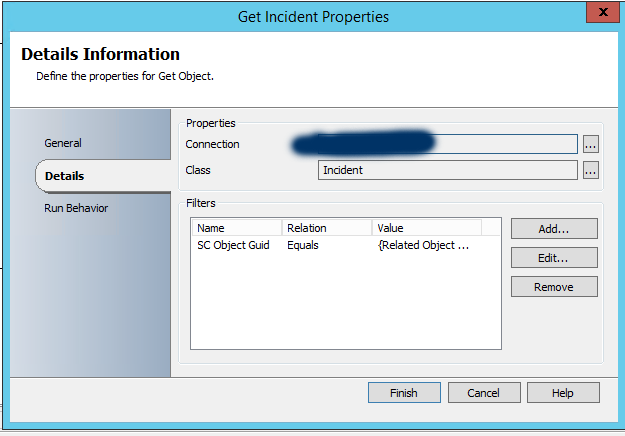
This step grabs all the incidents discovered in step 1

This is achieved by setting the SC Object Guid equal to the Published Data from Step 1

3. Get Relationship (Incidents to Attachments)

Here we're defining the relationship to obtain all attachments from those New Email Incidents. In this case, the related class is File Attachment (System.FileAttachment)

4. Get All Attachments
With the Get Relationship producing the related objects, we need a Get Object to grab the individual file attachments.

Again, we're going to use the File Attachment (System.FileAttachment) class to match the objects received the get "Get Relationship" step previously. The SC Object Guid equals the Related Object Guid

5. Get All Signature Attachments
This is going to look repetitive, but fret not the final payoff is at the end...


Again - I'm doing almost the same thing. The difference is now the filter is SC Object Guid equals the SC Object Guid from Step 4 (aka all of the attachments). Again, I know this is the same thing and I still don't have the photo attachments. I in fact still have all the same attachments in this step as I did in step 4...but read on, we will fix this!

6. Delete Relationship (Remove Signature Photos)
This one is really straightforward, delete the relationship between the Incident and the Attachment which effectively removes the attachment from the Incident!


Here the Object Guid to delete is the Relationship Object Guid from Get Relationship in Step 3.

Alright, I think I see what you did here. But this still deletes all attachments in it's current iteration. You said we were going to do less than some file size!

Link Condition...
The link between Get All Attachments and Get All Signature photos is where we're going to define the filter of our "less than" condition.


Whoa whoa whoa...hold on a second. Matches Pattern? Wait. Equals? There isn't less than! WHAT?! THIS CAN'T BE DONE!

Yeah...I painfully discovered the same thing. The Published Data property of "Size" from the Get All Attachments is text. That's right. Text. If it was an number, we could easily do this. To be honest, I wish I knew why this was the case but you know what, we can do this with matches pattern and building a regular expression

Ugh...I hate regular expressions. I immediately regret building this runbook.

Well. No use making you hit your head against the desk, here's the regular expressions to match the following ranges to insert into the value property of this link condition. By using these, your runbook will then remove attachments from new Incidents that are 1-X bytes:


1-1000
\b(?:1000|[1-9][0-9]{1,2}|[1-9])\b

1-2000
\b(?:2000|1[0-9]{3}|[1-9][0-9]{1,2}|[1-9])\b

1-3000
\b(?:3000|[12][0-9]{3}|[1-9][0-9]{1,2}|[1-9])\b

1-4000
\b(?:4000|[1-3][0-9]{3}|[1-9][0-9]{1,2}|[1-9])\b

1-5000
\b(?:5000|[1-4][0-9]{3}|[1-9][0-9]{1,2}|[1-9])\b

1-6000
\b(?:6000|[1-5][0-9]{3}|[1-9][0-9]{1,2}|[1-9])\b

1-7000
\b(?:7000|[1-6][0-9]{3}|[1-9][0-9]{1,2}|[1-9])\b

1-8000
\b(?:8000|[1-7][0-9]{3}|[1-9][0-9]{1,2}|[1-9])\b

1-9000
\b(?:9000|[1-8][0-9]{3}|[1-9][0-9]{1,2}|[1-9])\b

1-10000
\b(?:10000|[1-9][0-9]{1,3}|[1-9])\b

1-11000
\b(?:11000|10[0-9]{3}|[1-9][0-9]{1,3}|[1-9])\b

1-12000
\b(?:12000|1[01][0-9]{3}|[1-9][0-9]{1,3}|[1-9])\b

1-13000
\b(?:13000|1[0-2][0-9]{3}|[1-9][0-9]{1,3}|[1-9])\b

1-14000
\b(?:14000|1[0-3][0-9]{3}|[1-9][0-9]{1,3}|[1-9])\b

1-15000
\b(?:15000|1[0-4][0-9]{3}|[1-9][0-9]{1,3}|[1-9])\b


Once you've got your filesize requirements, check your runbook back in and click Run to get it started.


Done!
Hope this helped curb a common complaint against SCSM and potentially within your own deployment.

Sooo...uhhh...I have another file size for a regular expression you didn't list. I know you can't list every conceivable pattern, so....little help?

There are a few tools that can help you match a range of numbers with a regular expression. Bear in mind, matching numbers with a regex is inherently a bit more challenging because regex's aren't really meant to match numbers (integers). The fact this works, well is sort of hacking a regex to do it. Regardless, it works, so how can you build your own if this beast seems beyond your current scope of knowledge? Here's my two recommendations:

1. A lot of sites mention this one - utilitymill.com/utility/Regex_For_Range - I've used it once or twice before but a recent visit is asking for a login. No Bueno.

2. Regex Magic is something you will invariably come across in your searching for how to quickly build a regex with no experience building regular expressions. It's either a 14 day trial or $40 to purchase but I can certainly attest to it getting the job done. Make no mistake, learning that tool is a bit like learning Dreamweaver and not understanding HTML - you're teaching yourself how to use a tool, not understand the language.

Wednesday, February 10, 2016

In Defense of Class Extension vs. Inheritance

10:18 PM Posted by A , 2 comments
Hrmmm...


As I've shared on the About Me page, I'm just someone who loves Service Manager/System Center. I'm just another IT guy out there managing and helping SCSM deployments. So, in the time since my last post (which looking at it has been awhile...holy crap) and no less the deployment I provide advice on when asked/invited to my opinion has really started to change around the concept of Extending classes and Inheriting them. I would argue that I've taken a violent, 180 degree swing in the other direction. But I'll let you be the judge of what is best for you and your environment. But first, let's pretend for a bit and fast forward your SCSM deployment a few years into the future...


When you're doing authoring with the SCSM Authoring Tool (and by now, I think we all know that means Notepad++) and modifying SCSM functionality you almost always have to start your development with the fundamental question of...

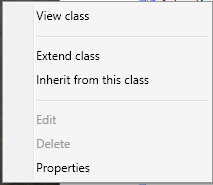
Inherit this class or Extend this class?

In a previous post of mine, we walked through building an employee onboarding process (and really building something to suit the idea of a host of HR related scenarios), we chose to Inherit the Service Request class. If you're new to SCSM reading that/similar posts may seem to make a great deal of sense...


Pros of Class Inheritance:
  • Inherited classes are unique and do not "disrupt" or change stock SCSM functionality that Microsoft ships SCSM with.
  • You can have really specific fields/concepts since they pertain to the new class instead of affecting the "core" class, in this way a derivative class has been created
    • This is great for things like Employee Management or Create Virtual Machine as we have a lot of fields that don't exist out of box and need to call them into existence
  • You can have a custom form exist in the same management pack as the inherited class
    • Makes the management of this "thing" easier since it's now grouped together into a single management pack

Cons of Class Inheritance:
  • You almost always are going to have to manually edit the XML before sealing
    • This isn't fun/it's tedious work
      • If you keep doing different inherited classes off of the same classes, this can get unruly quickly. This may be manageable as a single SCSM Admin but can quickly become rough as the SCSM Admin numbers grow.
    • It may go without saying, but it's the kind of thing that almost necessitates the position of a full time job to understand this XML, etc. Not a con persae, but really trying to draw attention to the care and feeding of a specific thing within any SCSM deployment
  • Reporting becomes a bit more challenging if you are not the one writing reports or are a SQL/System Center veteran as now your SQL team has to start understanding how the DW changes based on these Inherited Classes.
    • A bit more challenging if your SQL team are not one with SCSM
    • A bit more challenging because you have to custom build out your DW to support these new classes that technically are not the stock ones
      • It's not like this can't be done, but it a classic "just one more thing to do"

So with the above said, generally speaking as a newcomer to SCSM it seems to just make sense that...

Of course I have two or more different classes based on the core one Microsoft ships. I mean, it doesn't make sense to have things like "New Laptop" share things with the base Service Request class. That's why I'm not Extending classes...because I don't want these things jumbled up. It makes sense to keep them separated. I want to have unique classes for each of these requests.

And I too shared this line of thinking for the longest time, because for one reason or another it just made more sense to me that I had dedicated classes. "Of COURSE I would!" I'd say to myself and it's the Employee Management scenario that really highlights this nicely. Because if I had done Class Extension, then all Service Requests in the system gain the properties of "First Name" and "Department" etc. etc...but now I'm here to ask the following...


Why is that such a bad thing? If you don't use the field, you just don't use it. Do you use the OOB Scheduled Start Time in every one of your request offerings? Do you use the OOB Actual Cost in every one of your request offerings?

So then I really started taking this scenario to it's logical extreme. If I'm making the case for "Oh well Employee Management" is different...why is it different? Do I just not like the idea of putting these things together? Sure, maybe that is it. But technically speaking is there a reason it's "bad" persae? Because the above quote is exactly the thought that struck me over the course of the last few months. Think of all of the options Microsoft ships out of the box with the SR class. Think of how many request offering you have published out on your portal. Do you map to ALL of those fields? Probably not. In fact, if you're playing the cautionary game (i.e. avoiding customizations) you may just be mapping things to things like...

  • Alternate Contact Method
  • Description
  • Notes
  • Scheduled Start/End Date (because you need some kind of date field for your request)
  • Boolean you are mapping to some Runbook inside of the SR

Pros of Class Extension:
  • Extended Classes effect all instances of that class, new and old in your system. If you add the "Random Date Field" parameter to a SR or IR, every single SR or IR in the system would get this new property
  • Multiple, disparate templates can feed off of a similar List should you utilize it
    • In the HR scenario the list for Departments is now bound to this new SR Class. Request Offerings based on the stock SR class cannot use this!
  • No XML hacking required, this works exactly like you expect it through the Authoring Tool
  • You can have multiple management packs Extend the same Class
    • So you can still group like extensions into similar management packs
    • But I'd argue that you probably don't want to get crazy with this and would advise sticking to a single management pack extending a single class
  • Reporting doesn't have a net loss as these new fields appear in the DW on the respective Class table. From a SQL perspective, nothing has changed. So if you extend the IR class, it appears on the IncidentDimVw table as though it were actually a part of the IncidentDimVw table out of the box. This is genuinely awesome as you can transform the schema of SCSM through management pack authoring.

    Cons of Class Extension:
    • Extended Classes effect all instances of that class, new and old in your system. If you add the "Random Date Field" parameter to a SR or IR, every single SR or IR in the system would get this new property
      • Again...is this actually such a bad thing technically speaking?

    If anything what you should see as someone in IT, is effectively the same as Extending your Active Directory schema. It's still the same thoughtful planning of "Alright, if we extend the schema what is something that can hold true for a host of scenarios or always serve one very specific one?" But the advantage you have is that you can extend the SCSM class schema's through MULTIPLE management packs which means you could if you so chose - blow away one management pack that extends a class and only lose that specific data. To be clear, the data that would be lost is the data in your warehouse as those items you extend would be pulled on the next sync.

    So what about the Employee Management thing we created? Does this mean I retreat on that? Well...I think it does unfortunatley. To be honest, this is the one scenario I struggle with a lot but I think I have to concede that I'd actually do that differently now. I'd probably change the names of fields to be more generic in some cases, but I would opt for extending the SR class to support this functionality. Because of all the fields in that example, there is one that I think holds a host of future scenarios for your environment and that is "Department" as I shared above. In my example, I stressed the need to create a Department list so you could have a single place to edit and change departments within the SCSM console. This said...when you get approached about "Hey, we need a new Request Offering based on the stock SR template where someone can pick a department" guess what you can't do now?

    Yup. That's right....Short of continuing to use the Employee Management pack for future non-specific HR requests, you can't reference the Department field since it exists and is exclusively bound too this new Service Request class. In the case of a class Extension, all SRs would have the field and all future request offerings/ideas could leverage this same list. Otherwise, you end up with the unruly situation of multiple Department lists within the SCSM console. A less than desirable scenario as now you have multiple lists that effectively serve the same function that you'd have to keep both up to date with. If you're into PowerShell or Orchestrator this scenario is an automation nightmare if you take it to it's logical extreme. Again, I have to concede that over the last several months my opinion on this topic has changed radically and that Class Inheritance and it's respective management has to potential get out of hand really fast.

    Apart from the above scenario of department, what are some actual practical and useful class extensions? What about giving Change Request's a much needed Support Group? And maybe doing the same thing for Manual Activities and Problems? Maybe throw something like "Email Notes 01" into Review Activities so when email notification goes out to review you map certain parts of the request into a dedicated email note area? All in all, I think I'm at the point now where I can think of more reasons and examples to extend vs. inherit a class.


    In conclusion...
    It's with the all of the above said, I argue for Extending Classes in SCSM vs. Inheriting them. I think it makes for cleaner future administration, you still get the granularity of grouping like extensions together and you can continue to build out your SCSM deployment to support larger organization wide initiatives (i.e. using the tool for non-IT based departments such as an HR help desk, etc.)


    Saturday, October 17, 2015

    Deploying "Quick Resolves" for your Team

    12:33 PM Posted by A , No comments
    "Our new SCSM Deployment is just too much for simple things."


    I spend more time typing all this stuff into an Incident, applying it, closing it because of that stupid background workflow issue, re-opening it, then resolving it than I do actually fixing an issue! Make this less awful!

    or

    I just deployed Service Manager. It's hard enough convincing team members this is the ultimate solution, but I can't defend how obtuse the entire Incident resolution process seems for things that take less than a minute to fix.

    If there is a trend I've seen across SCSM deployment is that generally people implement the Exchange Connector and configure it to convert emails to Incidents because they are easier to work with as opposed to a Service Request...with all those activities. What's more, if you and your team are just getting started in SCSM, Incidents feel easier. You have Classifications, you have Support Groups, you have a lot of things that look and feel like a classic "ticketing" system. But more than likely you're familiar with one or both of the above scenarios.

    What can we do? We can Orchestrate ourselves a way out of this and develop Incidents that resolve themselves in a single click without any programming or reverse engineering of SCSM.


    PLEASE NOTE: The following (and really this entire post) is merely a suggestion to curb an issue I hear newcomers levy against Service Manager. What's more, we're solving this with the Incident from Exchange Connector scenario. Ideally, you'd implement a Service Request version of this so as to accurately track break/fix (Incident) against what's needed (Service Request). That said, I'm aware what I'm outlining probably isn't the most ITIL friendly thing.

    Let's Create a New Management Pack in SCSM
    1. Head into Administration
    2. Management Packs
    3. Create a new Management Pack, for the purposes of this demonstration let's call the management pack "Quick Resolve"

    4. Next, let's move over to Library
    5. Templates

    Before we move on, let's revisit the original two scenarios. What's something that happens on your help desk enough, that takes seconds to solve, you want analysts to enter into SCSM, and later report on? Password resets? Come on, there has to be something! Whatever that is...

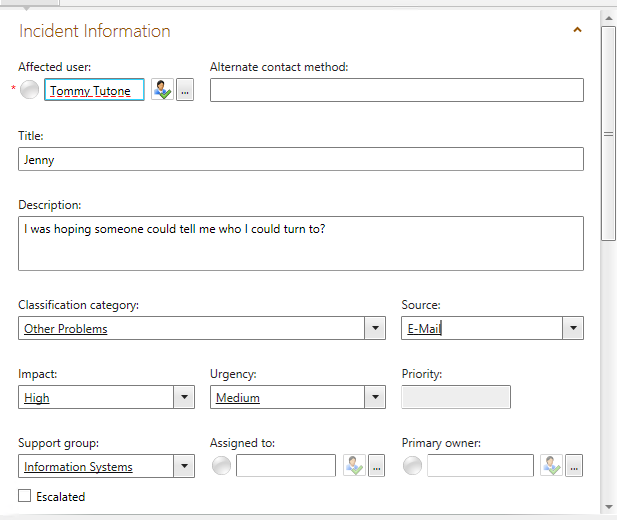
    6. Create a new Incident template titled the name of the issue you just came up with and save it in your management pack "Quick Resolves". Here's an example of the bare minimum fields you probably want to fill out in this new style of Incident template.


    The significance of building an Incident template is sparing your analysts/team members from filling out the same information, every time, for the same type of issue. What's more, by building a template you've just built a consistent "shape of data." That is to say, come reporting time from your data warehouse you can always find these Incidents based on their Title, Classification, Impact, Urgency, Resolution Time, etc.

    Hey, wait. You said the Incident would auto-resolve. We didn't do that! LIAR! I GOT YOU!

    Time to Move to Orchestrator
    Good news, we have a really, really, REALLY easy runbook to build to auto-resolve our Incidents.


    1. Initialize Data


    2. Get Relationship (Runbook to Incident)


    3. Get Incident
    SC Object Guid equals Related Object Guid from Get Relationship (Runbook to Incident)

    4. Get Relationship (Incident to Assigned To)
    Object Guid equals SC Object Guid from Get Incident

    4a. Link between Step 4 and Step 5
    Exclude, Relationship Class does not equal Assigned To User

    5. Get Assigned To
    SC Object Guid equals Related Object Guid from Get Relationship (Incident to Assigned To)


    6. Create Relationship (Set Resolved By from Assigned To)
    Since we want to give analysts credit for working Incident when it comes to reporting, we need to make sure we mark them as the Resolver of the Incident.


    In the above, we're defining...
    Source Class = Incident
    Target Class = Active Directory User
    Relationship Type = Resolved By User
    Source Object Guid = SC Object Guid from our original "Get Incident" activity
    Target Object Guid = SC Object Guid from our recent "Get Assigned To User" activity


    7. Format Incident Created Date (add 5 minutes)

    I added five minutes because my assumption here is that the Incident your analyst is working on is taking less than 5 minutes to resolve. Maybe you want to make this window even tighter? Your call. The point is, we're getting the created date of the Incident and making up a Resolution Time to be set. Again, we're defining a consistent "shape" to our data.

    8. Resolve Incident

    Here you'll notice I set three fields
    • Status = Resolved (duh)
    • Resolution Category = Walked Through Knowledge Article (because if you think about it, if your analysts are resolving stuff this fast shouldn't there be a knowledge article you are walking people through? Something you are educating someone on? Aren't by definition these style of Incidents a user training issue?
    • Resolved Date = The Created Date/Time + 5 minutes. Specifically "Format Result" from the previous format date time step


    Check your runbook in
    Sync your Orchestrator connector in SCSM


    Back to Service Manager!
    With your runbook synced into SCSM, let's build a Runbook Automation Activity Template from it!

    • Library -> Runbooks -> Find your Quick Resolve runbook we just built.

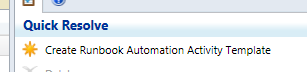
    Upon selecting it, in the top right hand corner choose "Create Runbook Automation Activity Template"


    What management pack are we going to save it in? How about the one we created when we started this whole thing?! Perfect!

    Once you're in your new template, give it a name, description, classify as necessary. But more importantly make sure you have "Is Ready for Automation" checked off.


    Next, head into the Runbook tab -


    The first step in our runbook we created a parameter called "ActivityGUID". Here you can see that very same parameter, but we need to map it to Object -> Id to ensure the data is passed correctly into Orchestrator when the Incident is saved.
    Hit OK and save yourself out of this window.
    FINALLY...
    Go back to your Incident template that you originally created for this "Quick Resolve" style Incident.
    Head into the Activities section of the Incident, hit add, and add your recently created Runbook Automation Activity.
    Save yourself out of the Incident window.
    Done
    So now, you've built a really awesome, quick way to work Incidents in your system. Now it's possible to analysts to choose "Create Incident from Template" and pick the IR Template we just created (runbook and all) OR they can Apply Template to a pre-existing Incident (aka something an employee submits that you have a "quick resolve" for so as to continue to set a consistent shape to your reporting data).
    The runbook will only engage once the Incident has been saved/committed into the system. Which means the only thing the analyst is filling out two fields, Affected User and Assigned To! Now analysts have but a single button to push to create Incidents and get credit for them in downstream reporting! No more weird background workflow issues preventing analysts from creating, saving, and resolving. They can resolve in one click, the OK button!
    It goes without saying, you can copy and build multiple types of this Incident style. Perhaps you want to do one for everything thing that isn't a Service Request yet (which is to say, everything you don't have a process for yet within your organization.)
    Wait, one last question. Why did you use Assigned To? Why not Created By User? Wouldn't that be more reliable? Wouldn't that mean analysts don't even have to fill themselves in as Assigned To?

    Don't forget the scenario we designed for... employees email Incidents into your help desk. So before you go flipping this runbook trying to make it easier, remember that if an employee emails an Incident in they are the Created By User. So unfortunately, that is probably a less than ideal reporting issue to get around.

    Sunday, September 13, 2015

    Malware Flagging and Reporting - SCCM, SCOM, SCSM, and SCO (part 2)

    2:00 PM Posted by A , No comments

    I promise this isn't going to be nearly as bad as the Employee Management thing.

    In this post, we'll assemble the Orchestrator runbook that...
    1. Converts the SCOM Alert/SCSM Incident to a Parent Incident.
    2. Queries your SCCM database for Malware Infected computers
    3. Creates Child Incidents that get attached to the Parent Incident
    4. Adds the SCCM context to each child incident such as Affected CI, malware type, severity, etc.
    5. Define the Primary User of the Computer as the Affected User of the respective Child Incident
    At the conclusion of this post we'll have SCCM alerts, that trigger SCOM alerts, that in turn create an SCSM Parent Incident, that triggers an SCO runbook that creates Child Incidents for each infected computer. If you missed Part 1 that establishes the majority of this setup, you can go back to it here. Otherwise, let's get on with it!

    Get the "SCORCH Dev - SQL" Integration Pack
    You'll need to get a Codeplex SQL Integration Pack for Orchestrator. I know you can write SQL queries out of box with SCO, but their results are less than ideal in terms of Orchestrator flow. This version will spit out the returned dataset in a much more consumable fashion for downstream activities. You can get this IP here.

    It also should be mentioned like many add-ons and tools in the System Center (Orchestrator) space; there are a host of options and as such, there a lot of different IPs that let you work with SQL. I'm personally a fan of this one. It's free, it's simple, and it gets data the way I've come to expect in Orchestrator. If you have another one you prefer (or have paid for) go ahead and use that.

    NOTE: Once imported, you must deploy the IP to all SCO management servers, runbook servers, and any designers where you want to build (and in turn, potentially execute) from. Otherwise you must force the execution of the runbook on a particular server via the runbook's Properties -> Runbook Servers tab.

    WHY: Presumably you have more than one Orchestrator server in the environment and have not changed where the runbook executes - Orchestrator will execute the runbook on an available server in the SCO group. However before execution (as in before you see it in Log or Log History) SCO will verify the IP exists on all available servers. If the IP isn't found the runbook will never execute and there will be no recorded Log History of it ever occurring. However you will see an error in the Events view about how "Resources could not be found."). Not knowing this would probably lead you to a fair amount of frustration as SCSM invokes the runbook and SCO has no recorded history of it ever occurring.

    Building the Runbook
    1. Initialize Data
    2. Get Relationship (Runbook to Incident)
    3. Get Object (Incident)
    4. Update Object (Incident - Is Parent = True)
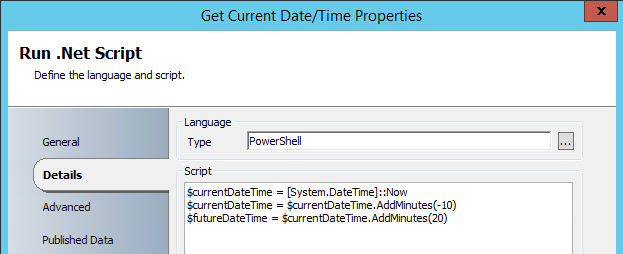
    5. Run .NET Script (Get the Current Date/Time)
    6. Format Start Date/Time (Start Time)
    7. Format End Date/Time (End Time)
    8. Run SQL Query
    9. Get Object (Windows Computer)
    10. Get Object (Active Directory User)
    11. New Object (Incident)
    12. Create Relationship (Incident has Affected CI)
    13. Create Relationship (Child Incident has Parent Incident)
    14. Create Relationship (Incident has Affected User)

    Here's a screenshot of the entire runbook


    1. Initialize Data


    2. Get Relationship (Runbook to Incident)


    3. Get Object (Incident).
    SC Object GUID Equals Related Object Guid from Get Relationship (Runbook to Incident)


    4. Update Object (Incident)
    Object GUID from "Get Incident"
    Is Parent = True


    5. Run .NET Script (Get Current Date/Time)

    I feel like this is the step where I'm bound to get someone saying "RIDICILOUS! NOT DOING IT!" - the SQL query we're going to execute against SCCM I need to have some kind of bounds. The most logical (to me at least) are a window of time where the malware was discovered by SCCM's Endpoint Protection. That said, a Run .NET Script was introduced into this runbook to get the current time, minutes into the past, and minutes into the future. For the purposes of this example you can see I said "10 minutes in the past" and "10 minutes into the future". Also, I know you see "20" there, but notice that the second line of the script updates the "currentDateTime" variable. You could just as easily change these values to a smaller window of time.

    Finally, these values are published back out to the Orchestrator data bus so we can use them in our SQL query.


    The two following activities take the outputs of the PowerShell script and format them into a time suited for our SQL Query. Both of these activities use the following Input and Output formats.
    6. Format Start Date (Start Time)
    7. Format End Date (End Time)


    8. Run SQL Query
    You can run the query with or without a global config. Personally, I like the global config route as I may want to use this connection in the future. Either way, you have to define a connection to your SCCM server's database and instance and your SCO service account will need Read on the SCCM DB. Here's the setup for the Global config and how it should look.

    This is the syntax of what your Global Config for the SQL IP for your SCCM DB should look like.


    Then here's the SQL query you'll use in the Run SQL Query Activity. Don't forget to update the WHERE statement to include your Format Result/published data from the two previous time based activities!

    SELECT        DISTINCT dbo.Computer_System_DATA.Name00 AS Computer, dbo.Users.UserName, dbo.EP_Malware.ThreatName, dbo.EP_ThreatCategories.Category, dbo.EP_Malware.Process, dbo.EP_ThreatSeverities.Severity
    FROM            dbo.EP_Malware INNER JOIN
                             dbo.Users ON dbo.EP_Malware.UserID = dbo.Users.UserID INNER JOIN
                             dbo.Computer_System_DATA ON dbo.EP_Malware.MachineID = dbo.Computer_System_DATA.MachineID INNER JOIN
                             dbo.EP_ThreatCategories ON dbo.EP_Malware.CategoryID = dbo.EP_ThreatCategories.CategoryID INNER JOIN
                             dbo.EP_ThreatSeverities ON dbo.EP_Malware.SeverityID = dbo.EP_ThreatSeverities.SeverityID 
    WHERE        (CONVERT(datetime, SWITCHOFFSET(CONVERT(datetimeoffset, dbo.EP_Malware.DetectionTime), DATENAME(TzOffset, SYSDATETIMEOFFSET()))) > 'formatResultStartTimeGoesHere')
                            AND (CONVERT(datetime, SWITCHOFFSET(CONVERT(datetimeoffset, dbo.EP_Malware.DetectionTime), DATENAME(TzOffset, SYSDATETIMEOFFSET()))) < 'formatResultEndTimeGoesHere')

    And what exactly is this SQL query getting you ask? This SQL query returns the Computer name, the Primary User(name), Malware Name, Malware Category, Malware Process name, and the Malware Severity. We also take the time formats and ensure they are converted from UTC to your local time zone. Now if you are really involved with SCCM you may have also immediately realized...

    Wait a second. There is a native SCCM Activity for Orchestrator that lets me execute queries. Stored queries in SCCM no less! Why am I not using that?

    Well...truthfully there is no good reason. You absolutely could do that. The thing is that has to be written in WQL which I'll be honest - is a skill I need to work on. As a result. It means you either "convert" my SQL query to a WQL query you store in SCCM or execute SQL against the DB from this IP. As you can see, I clearly opted for the SQL route. So if you are up for some conversion, go for it and leave a comment and help make this thing more awesome!

    Credit goes to Robin's CM IT Blog and the post "PowerShell: Get SCCM Malware Detections to CSV file" as providing the basis for this query.


    9. Get Computer
    There are a few ways you can do this match. Depending on what your SQL result returns for computer names you can use one of the following properties and of course your choice of Relation field. Although I can't think of reason you wouldn't want to use "Equals" here.

    Display Name, DNS Name, etc. equals fieldXX from your SQL query


    11. Get Primary User
    UserName equals fieldXX from your SQL query. I know I don't have any filters in the screen shot BUT the same exact rule/logic from the previous step applies. So, you'll need a filter!

    You'll also notice something we didn't do here and that's say/build something like "Get Relationship from Get Computer to Active Directory User." We just as easily could have as presumably you are syncing SCCM into SCSM - however, depending on the last time that connector ran the "Primary User" of a computer in SCSM maybe stale. As a result, this is why in the SQL query we pulled the Primary User directly from SCCM and are doing a match inside of a single activity within our runbook. That way we obtaining the most recent data possible.


    12. New Object - Create Incident
    Here's the properties I'll be setting for the Child Incidents that get created for each computer. Obviously pick and choose what you need. For example, if you already set the Classification Category within the SCSM Incident template there is no reason to set it here.


    In the Description of our Incident, we can consume the fieldXX properties from our SQL query. So we can insert the Infected Machine name, Malware Type, Path, Severity, etc.


    13. Create Relationship (Attach Computer to IR)
    If you've never used Create Relationship, it may take some getting used to. But it makes a great deal of sense once you have. What's the source class/point of origin? An Incident. What do we want to do to that Incident? Attach a Windows Computer (Target Class). What is the Relationship Type between these two Classes? SCO only lets you pick possible relationships! Finally, define what the GUIDs are for each of these. The Source Guid is our Incident. The Target Guid is our Computer.


    14. Create Relationship (Attach IR to Parent IR)
    This one may feel weird if you've never defined this kind of relationship. Source and Target are Incidents. The Relationship Type is "Has Parent Work Item". Notice that the distinction between child and parent is made in the definition of these items Guids. My Source Guid is the Incident I created within the execution of this runbook. The Target Guid is the Incident that is the inception of this runbook's execution/the parent we defined upstream earlier.


    15. Create Relationship (Set Primary User as Affected User)
    Source Class: Incident
    Target Class: Active Directory User
    Relationship Type: Affected User
    Source Object Guid: SC Object Guid from "Create Child Incident"
    Target Object Guid: SC Object Guid from "Get Primary User"


    That's That.


    "So why did you make the SQL query the way you did? Wouldn't I then only have a single Parent Incident with a single Child?"


    Sure. What about when the Malware Alert goes off for "Multiple Malware Detected" from SCCM? Etc. Etc. I'd say remove the DISTINCT portion of the query and then modify it to only get the duplicate machines returned from the query.

    The point is - I absolutely recognize this solution isn't perfect. I recognize that parts are clearly open to interpretation given everyone's environment. If anything it introduces the need for at least one or two more child Runbooks that flank perhaps based on the Title of the parent Incident. Perhaps you've REALLY customized your SCCM malware alerting. You'll have more than just a single scenario to account for! More than anything, I hope this serves as something you can build off of and personalize for yourself and your environment. Perhaps the following example is the first runbook that the Incident executes? Or maybe it only converts to a parent in the Multiple scenario and not the single scenario?

    More ideas? Ways to improve? Good! Seize the day and build!

    ...or perhaps it means the SCCM team needs to update their management pack for SCOM so it just does all of this magic for us? :)


    In the next post we'll go over the SCSM SQL query for your data warehouse to start building reports to get things like...
    1. Which Affected User's get the most malware?
    2. Which Affected User Departments get the most malware?
    If you are versed in your SCSM DW these reports may sound incredibly obvious given we have defined all the data we need too. If not, I'm writing the post!