
 |
| Hrmmm... |
As I've shared on the About Me page, I'm just someone who loves Service Manager/System Center. I'm just another IT guy out there managing and helping SCSM deployments. So, in the time since my last post (which looking at it has been awhile...holy crap) and no less the deployment I provide advice on when asked/invited to my opinion has really started to change around the concept of Extending classes and Inheriting them. I would argue that I've taken a violent, 180 degree swing in the other direction. But I'll let you be the judge of what is best for you and your environment. But first, let's pretend for a bit and fast forward your SCSM deployment a few years into the future...
When you're doing authoring with the SCSM Authoring Tool (and by now, I think we all know that means Notepad++) and modifying SCSM functionality you almost always have to start your development with the fundamental question of...
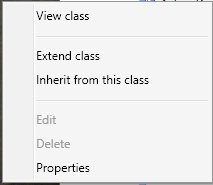
Inherit this class or Extend this class?
In a previous post of mine, we walked through building an employee onboarding process (and really building something to suit the idea of a host of HR related scenarios), we chose to Inherit the Service Request class. If you're new to SCSM reading that/similar posts may seem to make a great deal of sense...
Pros of Class Inheritance:
- Inherited classes are unique and do not "disrupt" or change stock SCSM functionality that Microsoft ships SCSM with.
- You can have really specific fields/concepts since they pertain to the new class instead of affecting the "core" class, in this way a derivative class has been created
- This is great for things like Employee Management or Create Virtual Machine as we have a lot of fields that don't exist out of box and need to call them into existence
- You can have a custom form exist in the same management pack as the inherited class
- Makes the management of this "thing" easier since it's now grouped together into a single management pack
- You almost always are going to have to manually edit the XML before sealing
- This isn't fun/it's tedious work
- If you keep doing different inherited classes off of the same classes, this can get unruly quickly. This may be manageable as a single SCSM Admin but can quickly become rough as the SCSM Admin numbers grow.
- It may go without saying, but it's the kind of thing that almost necessitates the position of a full time job to understand this XML, etc. Not a con persae, but really trying to draw attention to the care and feeding of a specific thing within any SCSM deployment
- Reporting becomes a bit more challenging if you are not the one writing reports or are a SQL/System Center veteran as now your SQL team has to start understanding how the DW changes based on these Inherited Classes.
- A bit more challenging if your SQL team are not one with SCSM
- A bit more challenging because you have to custom build out your DW to support these new classes that technically are not the stock ones
- It's not like this can't be done, but it a classic "just one more thing to do"
So with the above said, generally speaking as a newcomer to SCSM it seems to just make sense that...
Of course I have two or more different classes based on the core one Microsoft ships. I mean, it doesn't make sense to have things like "New Laptop" share things with the base Service Request class. That's why I'm not Extending classes...because I don't want these things jumbled up. It makes sense to keep them separated. I want to have unique classes for each of these requests.
And I too shared this line of thinking for the longest time, because for one reason or another it just made more sense to me that I had dedicated classes. "Of COURSE I would!" I'd say to myself and it's the Employee Management scenario that really highlights this nicely. Because if I had done Class Extension, then all Service Requests in the system gain the properties of "First Name" and "Department" etc. etc...but now I'm here to ask the following...
Why is that such a bad thing? If you don't use the field, you just don't use it. Do you use the OOB Scheduled Start Time in every one of your request offerings? Do you use the OOB Actual Cost in every one of your request offerings?
So then I really started taking this scenario to it's logical extreme. If I'm making the case for "Oh well Employee Management" is different...why is it different? Do I just not like the idea of putting these things together? Sure, maybe that is it. But technically speaking is there a reason it's "bad" persae? Because the above quote is exactly the thought that struck me over the course of the last few months. Think of all of the options Microsoft ships out of the box with the SR class. Think of how many request offering you have published out on your portal. Do you map to ALL of those fields? Probably not. In fact, if you're playing the cautionary game (i.e. avoiding customizations) you may just be mapping things to things like...
- Alternate Contact Method
- Description
- Notes
- Scheduled Start/End Date (because you need some kind of date field for your request)
- Boolean you are mapping to some Runbook inside of the SR
- Extended Classes effect all instances of that class, new and old in your system. If you add the "Random Date Field" parameter to a SR or IR, every single SR or IR in the system would get this new property
- Multiple, disparate templates can feed off of a similar List should you utilize it
- In the HR scenario the list for Departments is now bound to this new SR Class. Request Offerings based on the stock SR class cannot use this!
- No XML hacking required, this works exactly like you expect it through the Authoring Tool
- You can have multiple management packs Extend the same Class
- So you can still group like extensions into similar management packs
- But I'd argue that you probably don't want to get crazy with this and would advise sticking to a single management pack extending a single class
- Reporting doesn't have a net loss as these new fields appear in the DW on the respective Class table. From a SQL perspective, nothing has changed. So if you extend the IR class, it appears on the IncidentDimVw table as though it were actually a part of the IncidentDimVw table out of the box. This is genuinely awesome as you can transform the schema of SCSM through management pack authoring.
- Extended Classes effect all instances of that class, new and old in your system. If you add the "Random Date Field" parameter to a SR or IR, every single SR or IR in the system would get this new property
- Again...is this actually such a bad thing technically speaking?
If anything what you should see as someone in IT, is effectively the same as Extending your Active Directory schema. It's still the same thoughtful planning of "Alright, if we extend the schema what is something that can hold true for a host of scenarios or always serve one very specific one?" But the advantage you have is that you can extend the SCSM class schema's through MULTIPLE management packs which means you could if you so chose - blow away one management pack that extends a class and only lose that specific data. To be clear, the data that would be lost is the data in your warehouse as those items you extend would be pulled on the next sync.
So what about the Employee Management thing we created? Does this mean I retreat on that? Well...I think it does unfortunatley. To be honest, this is the one scenario I struggle with a lot but I think I have to concede that I'd actually do that differently now. I'd probably change the names of fields to be more generic in some cases, but I would opt for extending the SR class to support this functionality. Because of all the fields in that example, there is one that I think holds a host of future scenarios for your environment and that is "Department" as I shared above. In my example, I stressed the need to create a Department list so you could have a single place to edit and change departments within the SCSM console. This said...when you get approached about "Hey, we need a new Request Offering based on the stock SR template where someone can pick a department" guess what you can't do now?
Yup. That's right....Short of continuing to use the Employee Management pack for future non-specific HR requests, you can't reference the Department field since it exists and is exclusively bound too this new Service Request class. In the case of a class Extension, all SRs would have the field and all future request offerings/ideas could leverage this same list. Otherwise, you end up with the unruly situation of multiple Department lists within the SCSM console. A less than desirable scenario as now you have multiple lists that effectively serve the same function that you'd have to keep both up to date with. If you're into PowerShell or Orchestrator this scenario is an automation nightmare if you take it to it's logical extreme. Again, I have to concede that over the last several months my opinion on this topic has changed radically and that Class Inheritance and it's respective management has to potential get out of hand really fast.
Apart from the above scenario of department, what are some actual practical and useful class extensions? What about giving Change Request's a much needed Support Group? And maybe doing the same thing for Manual Activities and Problems? Maybe throw something like "Email Notes 01" into Review Activities so when email notification goes out to review you map certain parts of the request into a dedicated email note area? All in all, I think I'm at the point now where I can think of more reasons and examples to extend vs. inherit a class.
In conclusion...
It's with the all of the above said, I argue for Extending Classes in SCSM vs. Inheriting them. I think it makes for cleaner future administration, you still get the granularity of grouping like extensions together and you can continue to build out your SCSM deployment to support larger organization wide initiatives (i.e. using the tool for non-IT based departments such as an HR help desk, etc.)


